


CCTV Camera Buying Guide Kenya (2026): Best Type for Home, Shop or Farm and What Drives the Price
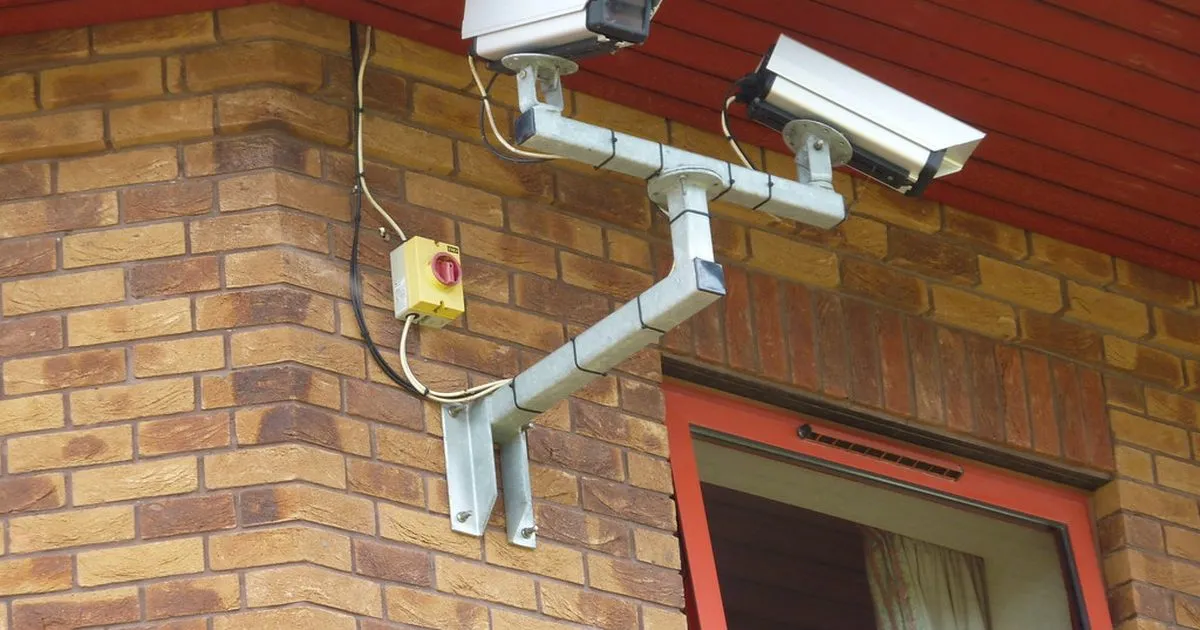
A CCTV system is not one product but a set: cameras, a recorder or cloud storage, a hard drive, cables or Wi-Fi, power and an app on your phone. Two quotes for "4 cameras" can be very different systems. This guide explains the choices so you can compare quotes properly and buy what your home, shop or farm actually needs.
Quick answer: For most homes and small shops, a 4-camera system with a recorder, a surveillance hard drive and phone viewing is the usual starting point. Choose IP (NVR) cameras for sharper images and simpler cabling over network cable, analogue HD (DVR) to keep costs lower, a Wi-Fi or bulb camera for one room or a small space, and a solar 4G camera for gates, farms and sites without power. Look for 2MP (1080p) or higher, night vision, a recorder with enough storage for 2–4 weeks, and power backup.
Types of CCTV Cameras Compared
| Type | How it works | Best for | Watch out for |
|---|---|---|---|
| Analogue HD + DVR | Coaxial cable carries video to a DVR recorder; separate power to each camera | Budget home and shop systems | More cables; image quality lower than IP at the same price level |
| IP camera + NVR | Network cable carries video and often power (PoE) to an NVR | Offices, larger shops, sharper images | Needs network know-how; costs more per camera |
| Wi-Fi camera | Connects to your Wi-Fi, records to a memory card or cloud | One room, a baby or a shop counter | Needs strong Wi-Fi and power; cloud plans may cost extra |
| Bulb / 360 camera | Screws into a bulb holder; rotates to cover a room | Indoor rooms, quick installs | Indoor only in most cases; limited range |
| Solar 4G camera | Solar panel + battery, sends video over a mobile data SIM | Gates, farms, construction sites, no mains power | Needs mobile signal and data bundles; battery on cloudy days |
Best CCTV Camera for Home With Mobile Connectivity
Almost every modern system has a phone app. What matters is how it connects: a recorder connected to your home internet (router) lets you watch from anywhere; a Wi-Fi camera does the same for one camera; a solar 4G camera uses its own SIM. Ask the installer to set up the app on your phone, turn on motion alerts and show you how to play back and download a clip.
Resolution, Lens and Night Vision
- 2MP (1080p) is a good minimum; 4MP–5MP helps read faces and number plates further away; 8MP (4K) needs more storage.
- Lens: a wide lens covers more but shows less detail; use a narrower lens on gates and doors where you need faces.
- Night vision: infrared gives black-and-white images in darkness; "full colour" cameras use a small light or sensitive sensor for colour at night.
- Weatherproof rating (IP66/IP67) for outdoor cameras.
- Audio: some cameras record sound; tell people where audio is recorded.
How Much Storage Do You Need?
Recording time depends on resolution, compression (H.265 uses less space than H.264), frame rate and how much movement there is. As a rough guide, one 1080p camera recording all day uses several gigabytes to tens of gigabytes per day. A 1TB surveillance hard drive often holds about two to four weeks for a 4-camera 1080p system on H.265. Ask the installer how many days your system will keep before it overwrites, and use motion recording to stretch it.
Power and Backup
CCTV is most needed during blackouts. Put the recorder, router and camera power supply on a small UPS or a solar backup so recording continues when power goes; see solar backup system price in Kenya. Use a surge protector, especially in areas with frequent outages.
What Drives the Cost of a CCTV System?
| Cost item | Why it varies |
|---|---|
| Number of cameras | Each camera adds cable, labour and a recorder channel |
| Camera type and resolution | IP and higher megapixels cost more than analogue 2MP |
| Recorder channels | 4, 8 or 16-channel recorders; buy room to grow |
| Hard drive size | Surveillance drives in 1TB, 2TB, 4TB and more |
| Cable and installation | Long runs, trunking, poles and ladders add labour |
| Power backup | UPS or solar to keep recording in blackouts |
| Brand and warranty | Known brands with local support cost more but last |
CCTV and the Law
Cameras that record people capture personal data, so Kenya's Data Protection Act, 2019 applies to businesses using CCTV. Put up a visible notice that CCTV is in use, point cameras at your own property (not into neighbours' homes or bathrooms), limit who can view footage and keep recordings only as long as needed.
Worked Example: A Shop With Four Cameras
A mini-mart owner installs four 2MP cameras: one on the till, one on the door to capture faces, one covering the aisles and one on the store room. The recorder and router sit on a small UPS, motion recording keeps about three weeks of footage, and the app sends alerts after closing hours. When stock went missing, she downloaded the clip from her phone the same evening.
Common Mistakes to Avoid
- Buying on camera count alone without checking resolution and storage.
- No backup power, so cameras go off during blackouts.
- Wide lenses on doors where you need faces.
- Default passwords left on the recorder and app.
- No CCTV notice for customers and staff.
Sell CCTV cameras? Open your shop on Buy More Mall and list them; buyers searching this guide can then find your products and prices.
Frequently Asked Questions
How much does a CCTV camera cost in Kenya?
It depends on the type, resolution, number of cameras, recorder, hard drive and installation. Compare full-system quotes that list each item, not only the camera price.
What is the best CCTV camera for a home in Kenya?
For most homes, a 4-camera 2MP–4MP system with a recorder, phone app, night vision and power backup. For one room, a Wi-Fi camera is enough.
Do solar CCTV cameras work at night?
Yes. They run on a battery charged by the panel in the day. Long cloudy spells can drain the battery, so choose a large enough panel and battery.
What is the difference between a DVR and an NVR?
A DVR records analogue cameras over coaxial cable; an NVR records IP cameras over network cable.
Can I watch CCTV on my phone?
Yes. Connect the recorder or camera to the internet and install the maker's app.
Cover photo: St Michael's Hospital: security by lydia_shiningbrightly, BY 2.0, via Openverse. Cropped.
Related Guides
Recent Posts

How to Price Delivery for an Online Shop in Kenya (2026): Fees, Zones and Free Delivery Maths

How to Package Products for Delivery in Kenya (2026): Boxes, Fragile Items, Liquids and Rain

How to Use the WhatsApp Business Catalogue (2026): Create, Share and Fix "Catalogue Not Showing"

How to Handle Customer Returns and Refunds in a Small Business in Kenya (2026) + Policy Template

Hardware Shop Stock List and How to Plan Stock for a Small Town in Kenya (2026)
CCTV Camera Buying Guide Kenya (2026): Best Type for Home, Shop or Farm and What Drives the Price
How to Choose an Office Chair in Kenya (2026): Best Chair for Back Pain and Long Hours

How to Buy a Laptop for Work or School in Kenya (2026): Specs, Budgets and New vs Refurbished
Power Tools for a Small Workshop in Kenya (2026): Starter List, Prices and How to Choose
 buymoremall
Kenya's Online Marketplace
Buy More Mall Kenya gives you a direct link to manufacturers, suppliers and service providers. Sellers are verified, there are no shortcuts, and customised orders come at affordable rates.
- Buy direct from manufacturers & suppliers
- Verified sellers and service providers
- Pay securely with M-Pesa
Shop
Sell & Earn
Help
Contact Us
- 0717 263 774
- Chat on WhatsApp
- buymoremallkenya@gmail.com
- Eastern bypass Ruiru Near Naivas super market @ kamakis & Nanyuki Neema Academy
- Contact page