


How to Manage Stock in a Small Shop in Kenya (2026): Stop Losses and Stock-Outs
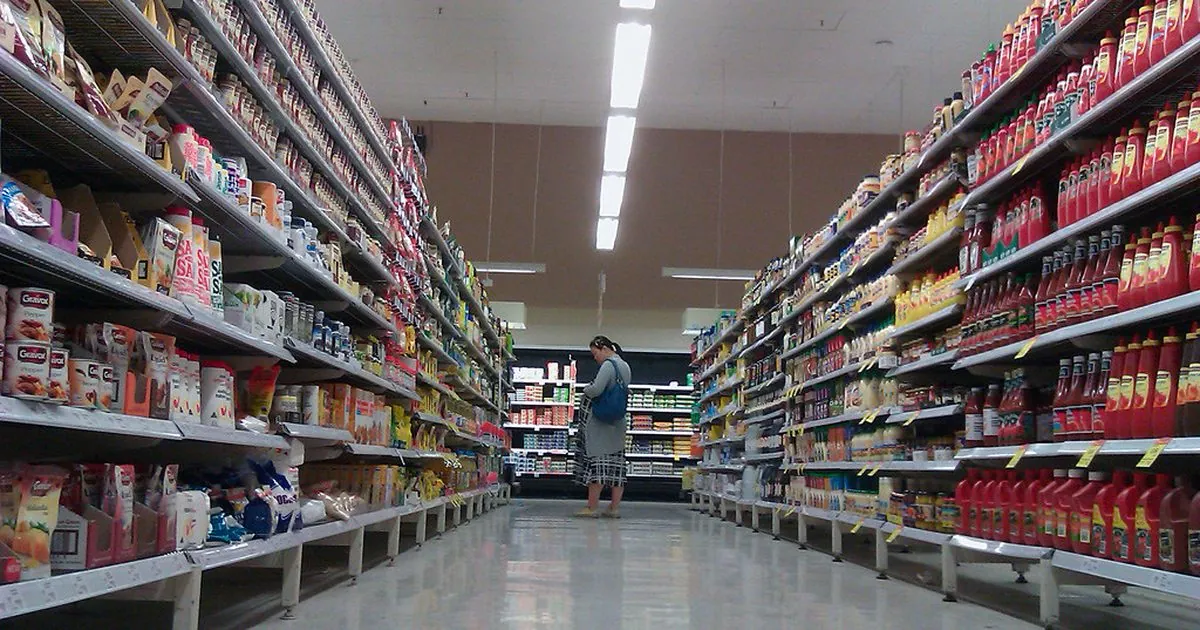
Stock is usually a shop's biggest investment. Too little and customers walk to the next shop; too much and your money sits on shelves, expires or gets stolen. Managing stock well means knowing what you have, what sells and when to reorder.
Quick answer: Count your stock regularly (fast items weekly, everything monthly), record every stock in and stock out, set a reorder level for each item (the quantity at which you buy more), sell older stock first (FIFO), and compare your counted stock with your records to spot losses. On Buy More Mall, My Business in your Buy More Mall seller dashboard: customers, stock levels and low-stock alerts on every package, plus buying prices, stock history, expenses, profit and daily cash from the Simba package up.
Step 1: Count What You Have
Do an opening stock take: list every item, quantity and buying price. Count when the shop is closed, with two people if possible. This becomes the starting point of your records.
Step 2: Record Stock In and Stock Out
| Movement | Record | Example |
|---|---|---|
| Stock in | Supplier, date, quantity, buying price | 20 bags cement at KSh 690 |
| Sales | Quantity sold (from sales book, till or online orders) | 6 bags sold Monday |
| Adjustments | Damaged, expired, returned, used in the shop | 1 bag hardened, written off |
Step 3: Set Reorder Levels
A simple rule: reorder level = average daily sales × days it takes to restock + a safety buffer. If you sell 4 bags of cement a day, restocking takes 2 days and you want 2 days of buffer, reorder at 16 bags. On Buy More Mall, an item shows as low stock when it falls to its low-stock quantity (or 5 if none is set).
Step 4: Know Your Fast and Slow Movers
| Type | What to do |
|---|---|
| Fast movers (sell daily) | Never run out: keep reorder levels and a reliable supplier |
| Slow movers (sell monthly) | Buy small quantities; bundle or discount to clear (see how to run a sale) |
| Dead stock (no sales in 3+ months) | Clear it and stop reordering |
Step 5: Sell Old Stock First (FIFO)
Put new deliveries at the back. This matters most for food, cosmetics, cement and anything that expires or deteriorates.
Step 6: Stop Stock Losses
- Compare counted stock with recorded stock every week: the gap is your loss.
- Keep high-value items behind the counter.
- Record every item given out on credit.
- One person receives deliveries and counts them against the delivery note.
- Do surprise spot checks on a few items.
Track Stock With My Business
- Open My Business in your seller dashboard.
- See every product's stock level, and low-stock items at the top.
- From Simba up, record stock in (with buying price), write-offs and adjustments; each move is saved in the history.
- Online orders reduce stock automatically, so your website never sells what you do not have.
Worked Example: A Minimart Stops Running Out of Bread and Milk
A minimart owner sets reorder levels for her 20 fastest items after one week of counting sales. She orders milk and bread daily and soap weekly. Stock-outs stop, and she cuts slow-moving spices she was buying monthly.
Common Mistakes to Avoid
- Buying big quantities because "the supplier gave a discount".
- No count for months, then a shock.
- Not recording damaged or expired items.
- Letting staff take items without recording.
Frequently Asked Questions
How do I manage stock in a small shop?
Count stock, record every item in and out, set reorder levels, sell old stock first and check for losses weekly.
How often should I do stock taking?
Fast-moving items weekly and a full count monthly.
What is a reorder level?
The stock quantity at which you place a new order so you do not run out before it arrives.
How do I know if staff are stealing stock?
Compare counted stock with recorded sales and stock-ins; a growing gap points to losses.
Can I track shop stock on my phone?
Yes. Sellers on Buy More Mall see stock levels and low-stock alerts in My Business.
Cover photo: The Daily Shoot #ds446 – Sense of depth or dimension by Rowan Peter, BY-SA 2.0, via Openverse. Cropped.
Related Guides
Recent Posts
How to Make an Invoice in Kenya (2026): Free Template, What to Include and How to Get Paid

How to Write a Quotation in Kenya (2026): Format, Sample and Tips to Win the Job
How to Keep Business Records in Kenya (2026): Simple System for Small Businesses
How to Manage Stock in a Small Shop in Kenya (2026): Stop Losses and Stock-Outs
How to Calculate Profit in a Small Business (2026): Formula and Kenyan Examples
KRA eTIMS for Small Businesses (2026): How to Register and Issue an eTIMS Invoice

How to Sell on TikTok in Kenya (2026): Videos, Lives and Turning Views Into Orders
How to Run a Sale or Discount Offer in Kenya (2026): 12 Ideas That Protect Your Profit

Rotary Hammer and Demolition Hammer Price in Kenya (2026): Which One Do You Need?
 buymoremall
Kenya's Online Marketplace
Buy More Mall Kenya gives you a direct link to manufacturers, suppliers and service providers. Sellers are verified, there are no shortcuts, and customised orders come at affordable rates.
- Buy direct from manufacturers & suppliers
- Verified sellers and service providers
- Pay securely with M-Pesa
Shop
Sell & Earn
Help
Contact Us
- 0717 263 774
- Chat on WhatsApp
- buymoremallkenya@gmail.com
- Eastern bypass Ruiru Near Naivas super market @ kamakis & Nanyuki Neema Academy
- Contact page